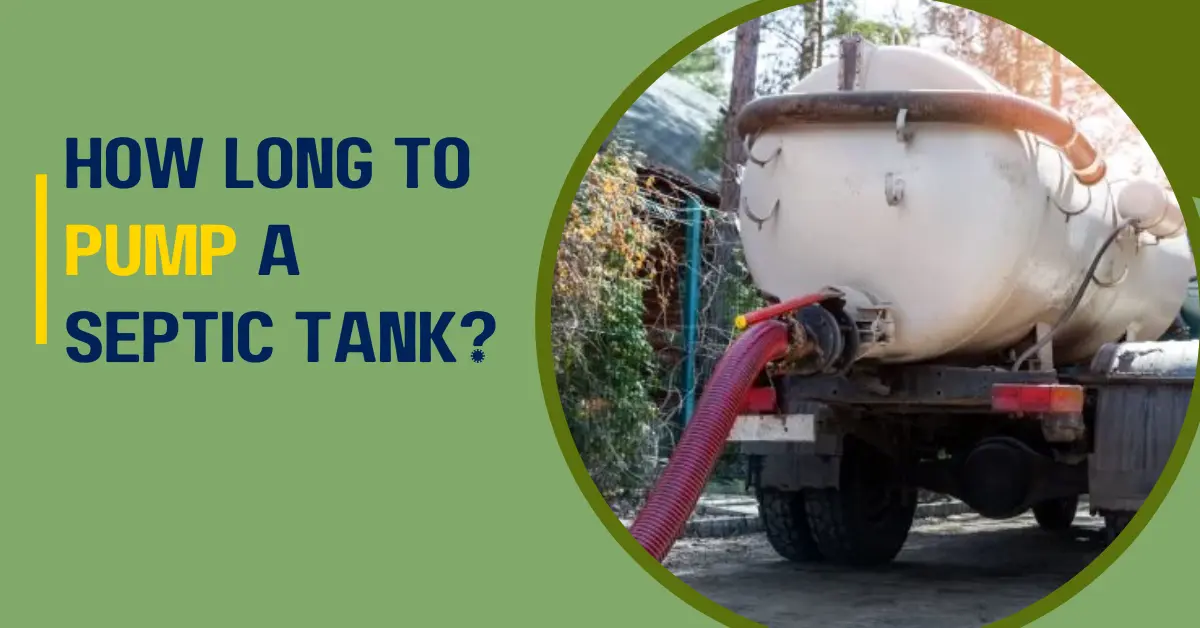
Wondering how long does it take to pump a septic tank? You need to understand the tank’s pumping cycle to keep your system healthy and avoid costly backups.
Generally, pumping a septic tank takes between 20 and 60 minutes, depending on factors such as the tank’s size, how full it is, and how easy it is to access.
For most residential tanks, usually between 1,000 and 1,500 gallons, the process averages 30 to 45 minutes with professional equipment such as commercial vacuum trucks.
In this guide, you’ll learn what affects pumping frequency, how to prepare for a hassle-free service, what happens during and after pumping, and smart tips to extend the time between pumps.
You’ll also find answers to common questions and local insights to help you choose the right service. Therefore, let’s get started!
How Long Does It Take to Pump a Septic Tank?
Here’s a complete breakdown of what to expect.
Typical Pumping Duration for Standard Residential Tanks
For 1,000 to 1,250‑gallon tanks, the expected time is around 20 – 30 minutes for the core pumping process.
For larger tanks (1,500 gallons or more), the pumping generally takes 45 – 60 minutes, based on sludge levels and condition.
Total Service Time: From Arrival to Departure
While the pumping may be relatively quick, the full appointment includes setup, inspection, and cleanup.
- Technician arrival and setup: 10 – 30 minutes
- Actual vacuum pumping: 20 – 45 minutes, depending on sludge volume and tank size
- Inspection of baffles, sludge depth & cleanup: 20 – 45 minutes
Total time for a standard home service: 1 to 3 hours, with an average of 1.5 to 2 hours.
When and Why It May Take Longer?
- The home has a buried or hard-to-find tank. So, the digging and locating can add up to 20 – 30 minutes more.
- The tank hasn’t been pumped in years. Therefore, thick sludge scum buildup slows down suction and may require extra prep time.
- The technician needs to remove heavy lids or debris. Especially during winter or if risers are buried.
Time Estimates by Septic Tank Size
Below is a breakdown of estimated pumping durations based on tank size.
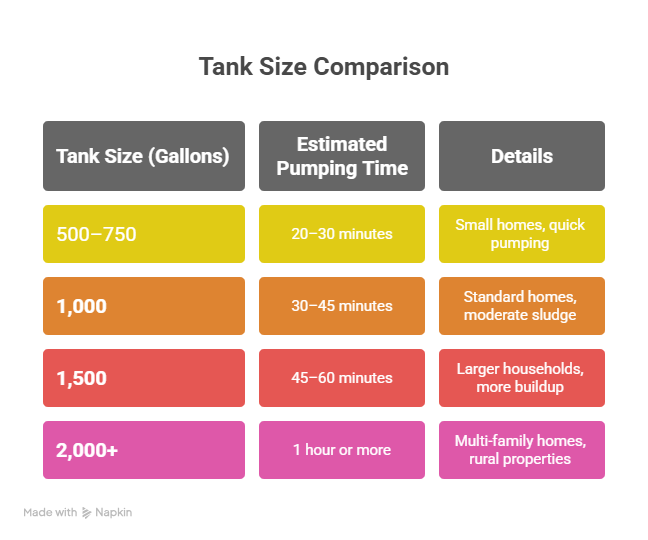
These times reflect core pumping time only, not including setup, inspections, or post-service cleanup.
The full appointment may take 1 – 3 hours, based on site access and tank condition.
Why Size Impacts Time
- More gallons = more waste volume
Larger tanks require more time to vacuum out all sludge and scum layers, especially if the tank hasn’t been serviced in years.
- More compartments to empty
Some larger tanks include separate chambers, filters, or additional pump tanks that each require time to service individually.
- Higher sludge accumulation
Bigger tanks can hold more solid waste, which may mean slower suction speeds and additional hose or equipment adjustments.
Septic Tank Pumping Process Explained (Step-by-Step)
Here’s a clear, professional breakdown of each stage, so you know exactly what to expect.
Step 1: Locating the Septic Tank
The technician begins by finding the exact location of your septic tank using property records, past service maps, or tools like soil probes and electronic locators, if needed.
If you already know where your tank is, marking the spot in advance can help speed up the process.
Step 2: Digging (If No Riser Is Installed)
If your tank doesn’t have a riser, the technician will need to dig to uncover the lid. This involves carefully removing soil and can add 15 – 30 minutes, depending on the depth and terrain.
Installing a riser afterward can save time and effort in future pumpings.
Step 3: Opening the Tank Lid
The technician carefully removes the tank cover to access its contents, taking care not to damage the lid or surrounding area.
Safety precautions are strictly followed due to the presence of hazardous gases and fumes.
Step 4: Pumping Out the Tank
The vacuum truck suctions out both liquid and solid waste from the tank. Thick sludge may need stirring to break up before removal.
For average residential tanks (1,000 – 1,250 gallons), this process generally takes 30 – 45 minutes.
Step 5: Rinsing & Backflushing (If Necessary)
Sometimes, the tank is rinsed by backflushing water to loosen hardened debris. This step isn’t always necessary and is done only when the buildup is heavy.
Step 6: Visual Inspection
A skilled technician inspects the tank while pumping, looking for cracks, root intrusion, damaged baffles, or corrosion.
They note sludge levels for records and alert you to any signs of early failure or maintenance needs.
Step 7: Closing the Lid & Site Clean-Up
After pumping, the lid is securely replaced, and any soil removed during digging is refilled. Equipment is cleaned and sanitized, and the service area is left tidy and safe.
You’ll often receive a report or invoice detailing the work performed, findings, and recommended timing for your next pumping.
Risks of Delaying Septic Pumping
Delaying pumping of your septic tank can lead to signs of septic system failure or serious problems for your health, home, and wallet.
1. Slow Drains & Backups
When your septic tank nears capacity, wastewater has nowhere to go, and it can cause sinks, toilets, and showers to drain slowly or clog repeatedly.
2. Foul Odors Indoors & Out
Notice unpleasant sewage-like smells in your home or around the yard? These odors often come from gases or waste surfacing due to system overload.
3. Pooling Water or Lush Grass
Wet spots or standing puddles near the tank or drain field, even during dry weather, mean untreated wastewater is surfacing.
Unusually green, soft, or spongy grass over the drain field also signals excessive moisture from seepage.
4. Gurgling or Bubbling in Pipes
Gurgling noises from toilets or drains typically signify trapped air or slow drainage from a full septic tank.
5. Sewage Backups Inside the Home
Untreated wastewater may begin backing up into bathtubs, toilets, or floor drains—an urgent situation that demands immediate professional attention.
Factors That Influence Septic Tank Pumping Time
Here are the main factors that can speed up or slow down the job.
1. Tank Size (500 to 2,000+ Gallons)
Smaller tanks (500 – 750 gallons) generally take 20 – 30 minutes to empty, while standard residential tanks (1,000 – 1,250 gallons) may take 30 – 60 minutes.
Larger or commercial tanks over 2,000 gallons can take more than an hour due to the increased volume of wastewater and solids.
2. Accessibility of the Tank
If the tank is far from the driveway or parking area, longer hoses are needed, which slows the process.
Buried or hidden lids may require digging, adding 15 – 30 minutes or more. Obstacles like fences, landscaping, or tight spaces can also cause delays.
Pro Tip: Keep your tank lid exposed or install a riser to make future servicing quicker and easier.
3. Tank Condition & Maintenance History
If your tank hasn’t been pumped in several years, the waste inside can become thick, compacted, and difficult to remove.
Hardened sludge or clogs may require extra time to break up and vacuum out. Additionally, tanks in poor condition may need inspection or special handling before pumping can begin.
4. Sludge and Scum Levels
Tanks with heavy sludge buildup, often due to high water usage or long-term neglect, take significantly longer to pump.
Thick sludge slows suction, may require multiple hose passes, and often needs mixing or agitation to remove.
This is especially common in homes that haven’t had their tank pumped in over five years.
5. Weather Conditions
Heavy rain or snow can make it difficult to locate or access the septic tank.
Frozen ground may delay digging or lid removal, while muddy or slippery terrain can slow vacuum truck setup and make hose handling more challenging.
6. Equipment Used by the Service Provider
Modern vacuum trucks with high-powered suction can pump your tank faster and more efficiently.
In contrast, older or underpowered equipment may take much longer. Additionally, using longer hoses can slightly reduce suction strength and increase pumping time.
7. Presence of Risers
Risers are access extensions that bring your septic tank lid up to ground level. It allows technicians to begin pumping right away.
Without a riser, they must dig to locate and expose the lid. It adds time, labor, and possibly extra cost.
Installing risers is a smart one-time investment that saves time and money during every future service.
Pre‑Pump Checklist: Prepare in Minutes
Here’s a quick checklist to make the septic tank pumping process smoother, faster, and more efficient.
1. Pause Water Usage During Service
Avoid flushing toilets, running the dishwasher, washing the laundry, or taking showers during the pumping process. Because it can disturb the waste layers inside the tank, add unnecessary volume during removal, and complicate accurate cleaning.
2. Know Your Septic Tank Location
Be ready to show the technician where your septic tank is. If you know the exact location and lid access, mark it with a flag or object.
Installing a riser can save time and digging fees in future visits.
3. Note Any Warning Signs
Make a list of recent symptoms like slow drains or backups, gurgling pipes, foul sewage odors, or pooling water and soggy grass near the drain field.
Sharing these details helps the technician diagnose problems beyond just pumping.
4. Schedule Regular Inspections
Pumping is only one aspect of septic care. Keep your system healthy by scheduling inspections every 1 – 2 years and pumping every 3 – 5 years, based on usage and tank size.
Preventive maintenance is always more cost-effective than emergency repairs.
What Happens During Septic Tank Pumping?
Here’s what a professional technician does during the pumping process:
1. Vacuum Truck Removes Waste
Once the tank lid is opened, a powerful vacuum hose is inserted to remove all three layers: scum (oils and floating solids), effluent (partially treated liquid), and sludge (solid buildup).
This process usually takes 20 – 60 minutes, based on tank size and condition, with residential tanks (1,000 – 1,500 gallons) averaging 30 – 45 minutes.
2. Inspection of Tank Components
As the tank empties, the technician inspects key components: inlet and outlet baffles that guide flow and block solids, tank walls and bottom for cracks, corrosion, or root intrusion, and signs of backflow or failure.
Early detection during pumping helps prevent costly septic emergencies later.
3. Effluent Filter Maintenance
If your system has an effluent filter on the outlet pipe, the technician may clean or replace it to prevent solids from entering the drain field.
If you don’t have a filter, consider installing one to help extend your system’s lifespan.
Post-Pumping Tips to Avoid Future Problems
Follow these expert-backed tips.
1. Avoid Flushing Non-Biodegradable Items
Protect your tank by flushing only toilet paper, nothing else.
Never flush:
- Baby wipes (even “flushable” ones)
- Paper towels
- Feminine hygiene products
- Diapers
- Dental floss
- Grease or cooking oil
2. Spread Out Water Usage
Don’t overload your system with too much water at once.
Space out laundry loads throughout the week, showers and baths across the day, and dishwasher and washing machine cycles.
3. Use Septic-Safe Cleaners
Harsh chemicals can kill the beneficial bacteria in your septic system. Use biodegradable, non-toxic, “septic-safe” cleaners and avoid bleach-heavy products, antibacterial soaps, or drain cleaners.
How Often Should You Pump Your Septic Tank?
Short answer: Every 3 to 5 years.
Better answer: It depends on your tank size, household size, water usage, and habits.
Here’s how to determine the right pumping frequency for your home.
Household Size Matters
The more people in your home, the faster your tank fills. For example:
A family of 4 with a 1,000-gallon tank should pump every 2.5 to 3 years. But, a single person with the same tank might go 5+ years without issues
Water Usage Habits
Frequent laundry, long showers, and high dishwasher usage increase the load on your septic system.
If your household hosts guests often, uses a garbage disposal frequently, and has high water usage, then stick to the lower end of the 3 – 5 year range or even consider pumping every 2 – 3 years.
Septic Tank Size Estimates
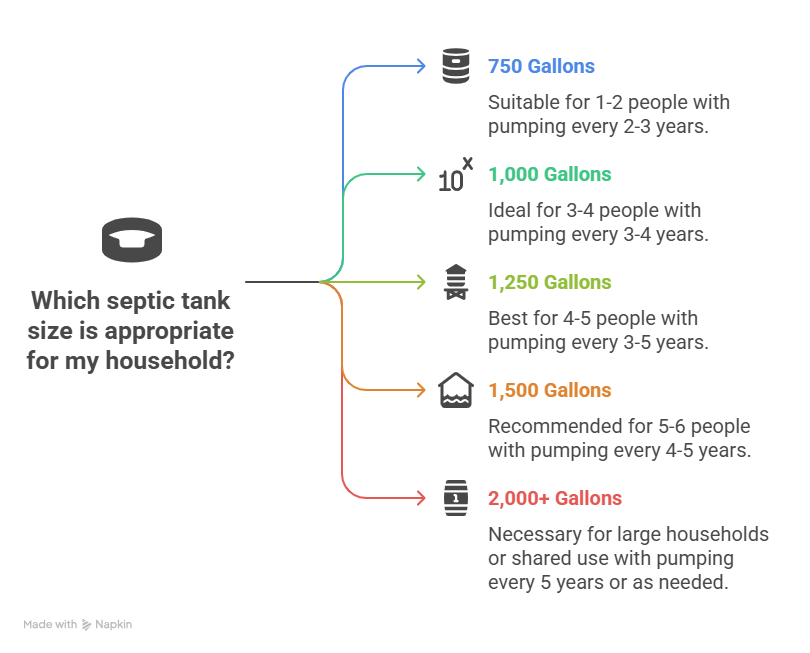
Signs Your Septic Tank Needs Pumping
Ignoring the warning signs can lead to expensive repairs.
1. Slow Drains Throughout the House
If your sinks, showers, or tubs are draining noticeably slower, it could mean your septic tank is reaching capacity. Especially when multiple drains are slow at once.
2. Foul Odors Inside or Outside
A properly functioning septic tank is sealed tightly. If you notice a rotten egg smell around your drains, yard, or tank area, then it means most likely gases are escaping due to a full tank or blockage.
3. Pooling Water or Soggy Ground in Yard
Seeing standing water or wet spots in your lawn (especially near the drain field) could indicate your tank is full, the drain field is overloaded, and wastewater is backing up.
4. Gurgling Sounds in Pipes or Toilets
Strange noises when you flush or run the sink? That’s air trapped in the pipes. It’s another clue that waste isn’t flowing smoothly due to a full tank or backup.
FAQs
Can pumping a septic tank take longer than an hour?
Yes, pumping can take longer than an hour if the tank is over 1,500 gallons, has heavy sludge buildup, or is difficult to access due to deep burial or lack of a riser. Extra time may also be needed if the technician performs a detailed inspection or filter cleaning.
What if my septic pumping is taking too long?
If pumping is taking longer than expected, it may be due to clogs, thick waste buildup, a hard-to-reach tank location, or inefficient equipment. It’s also possible the technician is performing added services like inspections or maintenance, which naturally extend the time.
Does the season or weather affect septic tank pumping?
Yes, seasonal conditions can impact pumping time. In winter, frozen ground or ice buildup can delay access, while in rainy seasons, wet soil and poor terrain may slow down the process. Moderate weather, like spring or fall, offers ideal conditions for septic service.
Should I be home during septic pumping?
While not mandatory, being home during pumping is helpful. You can provide access to the tank, answer technician questions, and receive updates on system condition or potential issues in real-time.
How often should my septic tank be pumped?
Septic tanks typically need to be pumped every 3 to 5 years, depending on household size, water usage, and tank capacity. A family of four with a 1,000-gallon tank usually falls within the 3-year mark.
What tools or equipment are used during pumping?
The process uses a vacuum pump truck with industrial hoses to extract waste. In some cases, the technician may also use water jets for backflushing and inspection tools to check baffles, leaks, or the filter system.
How do I make sure my septic pumping goes fast and smoothly?
Ensure your tank location is marked, lids are accessible, and avoid flushing grease or non-degradable items. Installing a riser can also drastically cut down pumping time in future visits.
Bottom Line
Septic tank pumping generally takes 20 to 60 minutes, based on tank size, waste levels, and accessibility. Most residential tanks in the 1,000 – 1,250 gallon range are cleared in under an hour with professional equipment.
Delays in pumping can lead to slow drains, unpleasant odors, or even system failure. If you’re unsure about your tank’s condition, it’s always best to consult a licensed septic professional.
Keep a log of every pumping date, and set reminders for future maintenance. Consistent care is the easiest way to avoid costly repairs and extend the life of your septic system.
Flush smart, live clean!